Folders Tab of Options Form
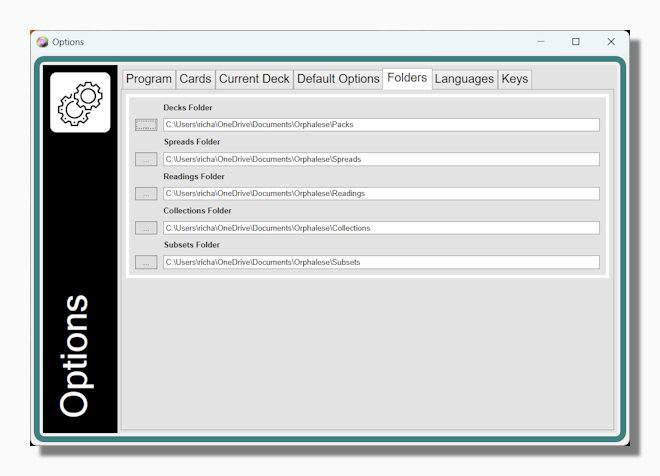
Here you can set where the program looks for its libraries of Decks, Spreads, Readings, Collections and Subsets. By default each folder is initially located in [Documents]/Orphalese, as follows:
| Decks | [Documents]/Orphalese/Packs |
| Spreads | [Documents]/Orphalese/Spreads |
| Readings | [Documents]/Orphalese/Readings |
| Collections | [Documents]/Orphalese/Collections |
| Subsets | [Documents]/Orphalese/Subsets |
| Tiles | [Documents]/Orphalese/Tiles |
Deck Browsing Limit: The Deck Browsing Limit is a protection against the inexperienced user accidentally choosing a high level folder that contains too many sub-directories. Whatever folder you choose for your Decks folder, the program will use it as the basis for your My Decks menu. This means it recursively analyses every folder in that path to decide which ones are legitimate decks which can be used with the program and which ones are simply folders. If the wrong folder is chosen (for example a high level operating system folder) the program could get stuck trying to build the menu. The Deck Browsing Limit ensures this can't happen by breaking out of the loop when it has counted up to the established limit and showing a message like the following:
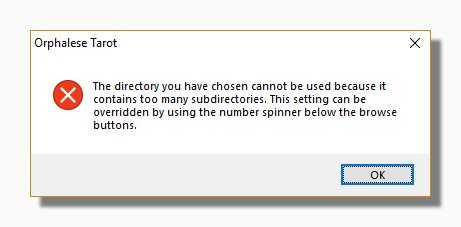
If you really have more decks than the limit displayed (300 by default) you can increase it as desired using the number spinners or just typing in the new number.